
Group Calibration Sessions
Group calibrations allow multiple calibrators to review conversations together and reach a consensus, creating a "gold standard" evaluation that can be compared against the AI.
Starting a Group Calibration
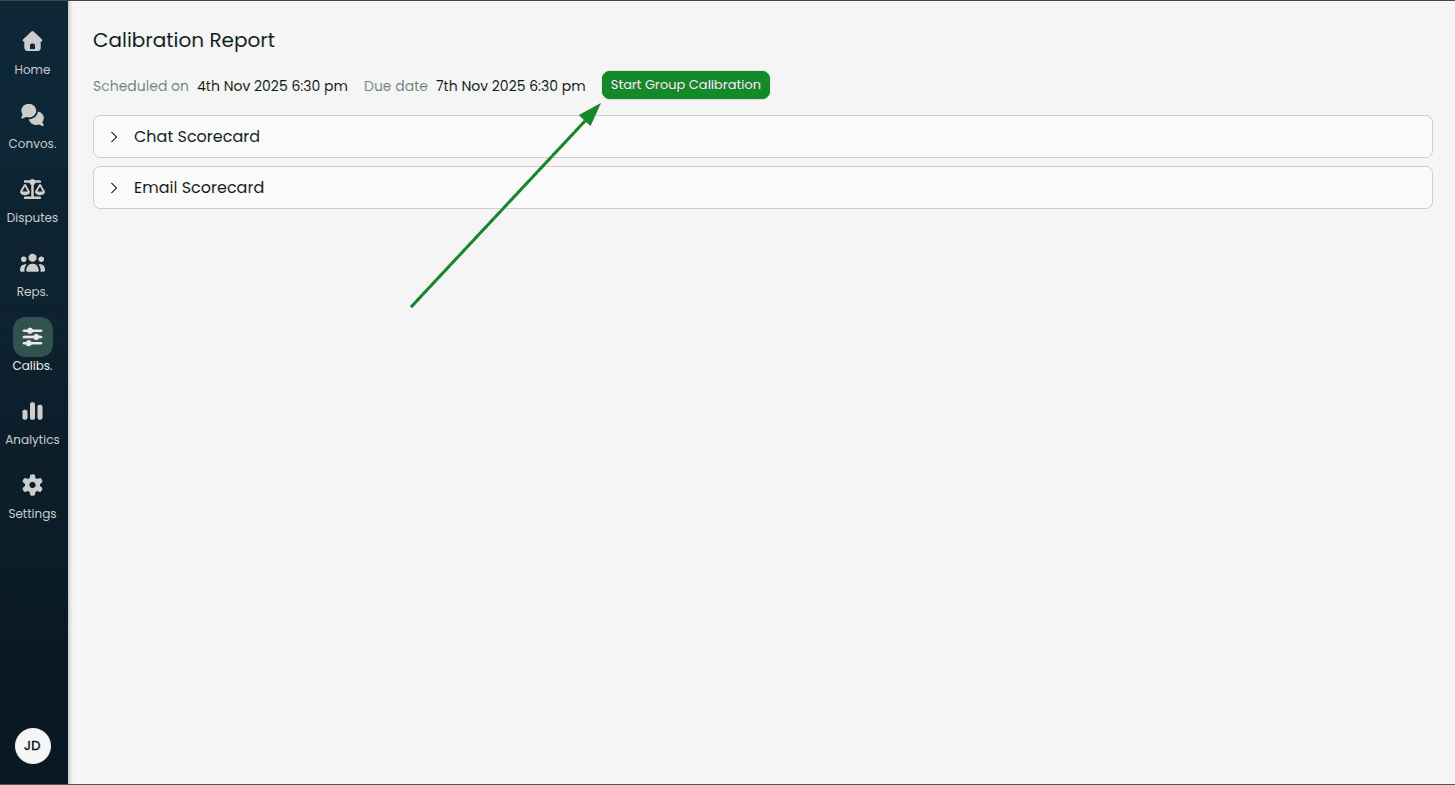
From a calibration report, click Start Group Calibration
Select the conversations you want to calibrate as a group using the checkboxes
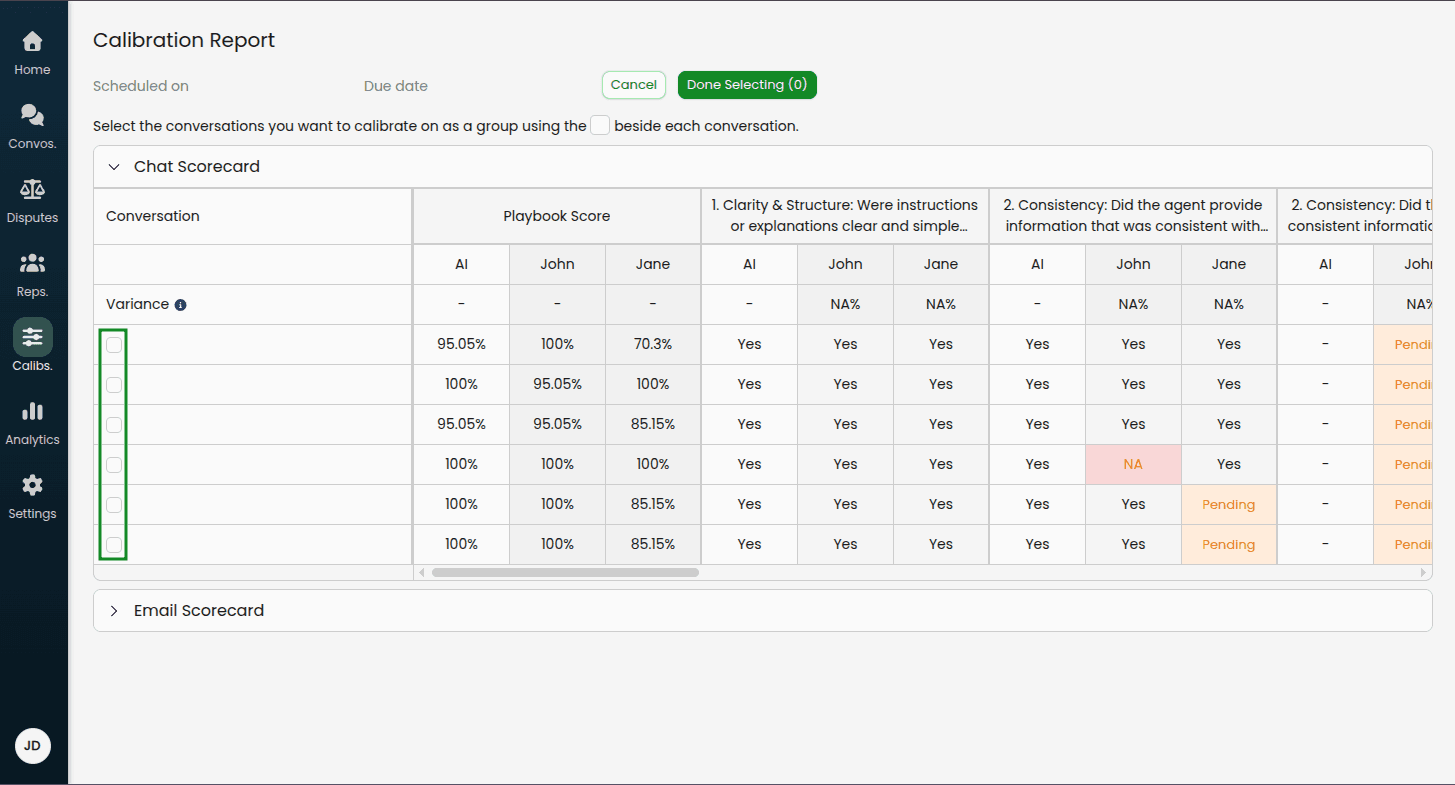
Click Done Selecting
Note: You can change the selected conversations later if needed by clicking "Change Conversations".
Completing a Group Calibration
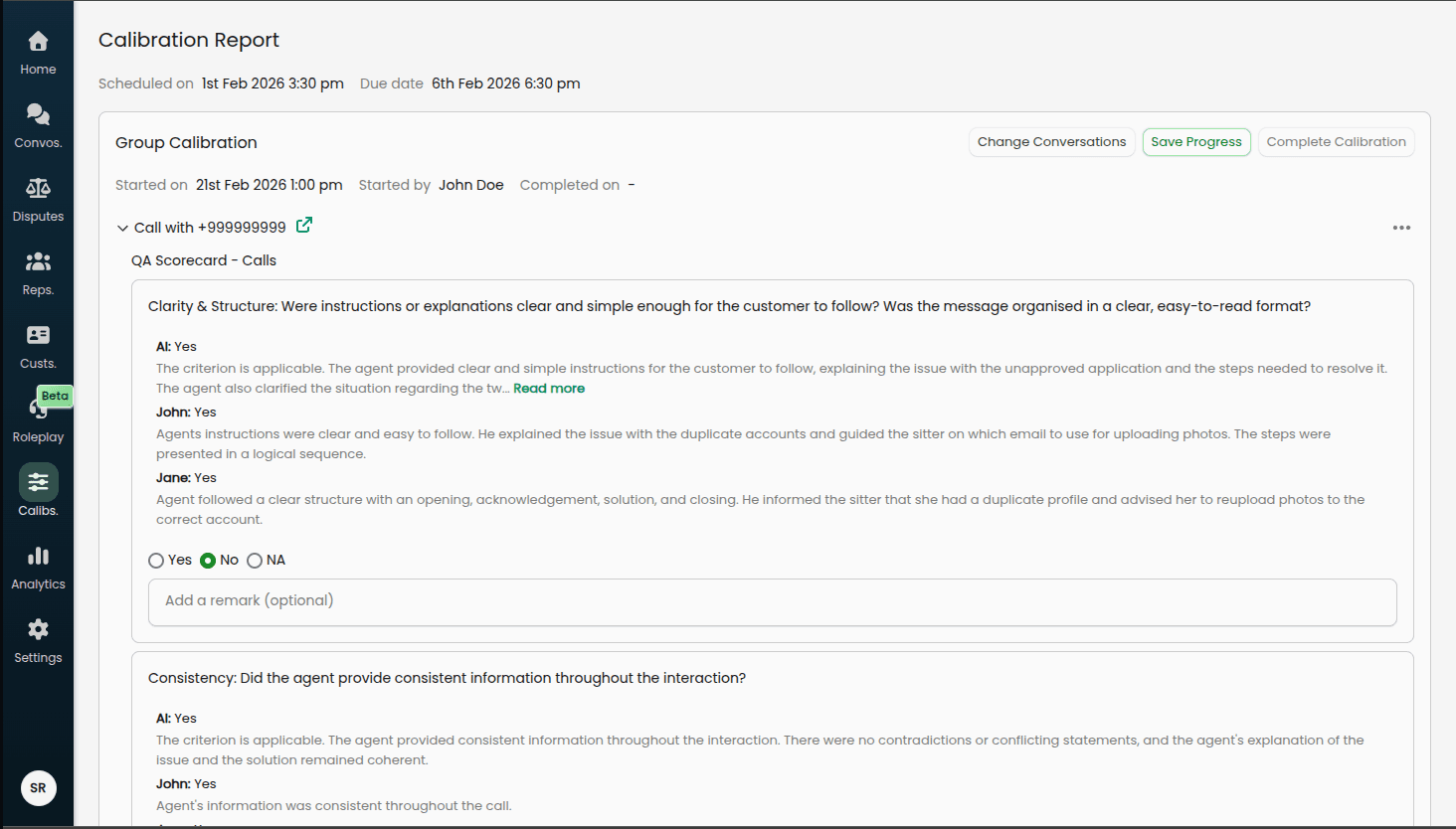
Once started, the Group Calibration section appears at the top of the report.
Review Process
For each selected conversation:
Expand the conversation in the accordion
Review each playbook and criterion
Reference the read-only evaluations shown for each calibrator and the AI, including any remarks they provided
Select the independent consensus value using the fixed radio buttons: Yes, No, or NA
Optionally add a remark to explain the consensus decision
Consensus Selection
For each criterion, you will see:
The AI's original evaluation (read-only)
Each calibrator's original evaluation and any remarks they left (read-only)
Below these, select the consensus value that the team agrees is correct using the Yes / No / NA radio buttons. This is an independent selection — it does not have to match any individual calibrator or the AI.
You can also record an optional remark to document the reasoning behind the consensus decision.
Progress Tracking
Each conversation shows a checkmark icon when all criteria have been reviewed and consensus values selected.
Saving and Completing
Save Progress: Saves your current selections without completing the calibration (you can return later)
Complete Calibration: Finalizes the group calibration (only enabled when all conversations are complete)
Group Calibration Report View
After completing a group calibration, the report switches to a tabbed view:
Group Calibration Tab
Displays a table comparing all calibrators' evaluations (including the AI) against the consensus value.
Calibrator Score summary (shown above the playbook tables):
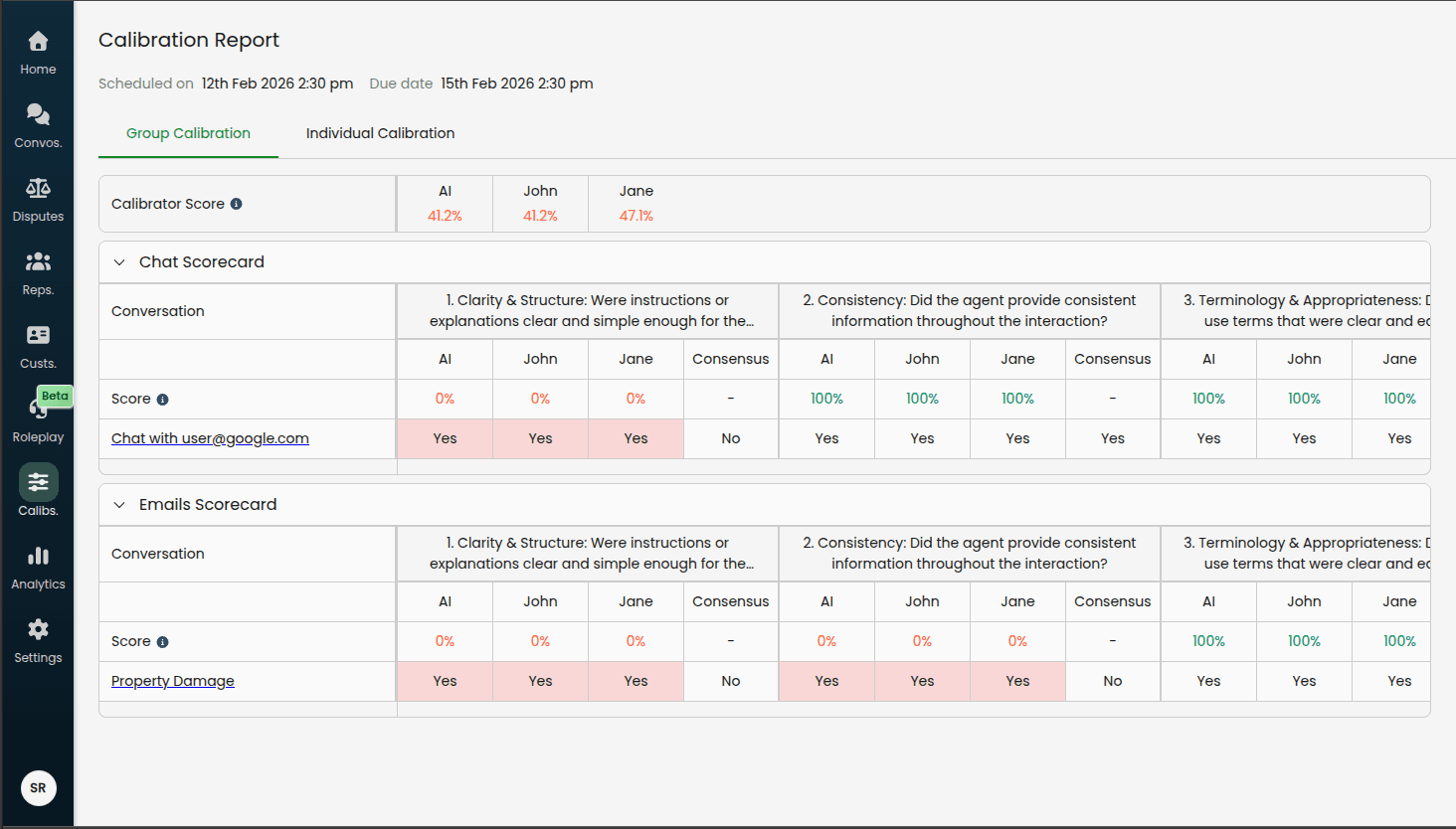
A compact table showing the overall accuracy score for each calibrator and the AI across all criteria in the session. Scores are colour-coded:
Green: ≥ 90% agreement with consensus
Orange: 70–89% agreement
Red: < 70% agreement
Per-playbook tables show:
AI Column: The AI's original evaluation for each criterion
Calibrator Columns: Each calibrator's original evaluation
Consensus Column: The group's agreed-upon correct evaluation
Score Row: Per-criterion accuracy for the AI and each calibrator (percentage of conversations where their value matched the consensus)
Highlighted cells (red/pink background) indicate where a calibrator or the AI differed from the consensus.
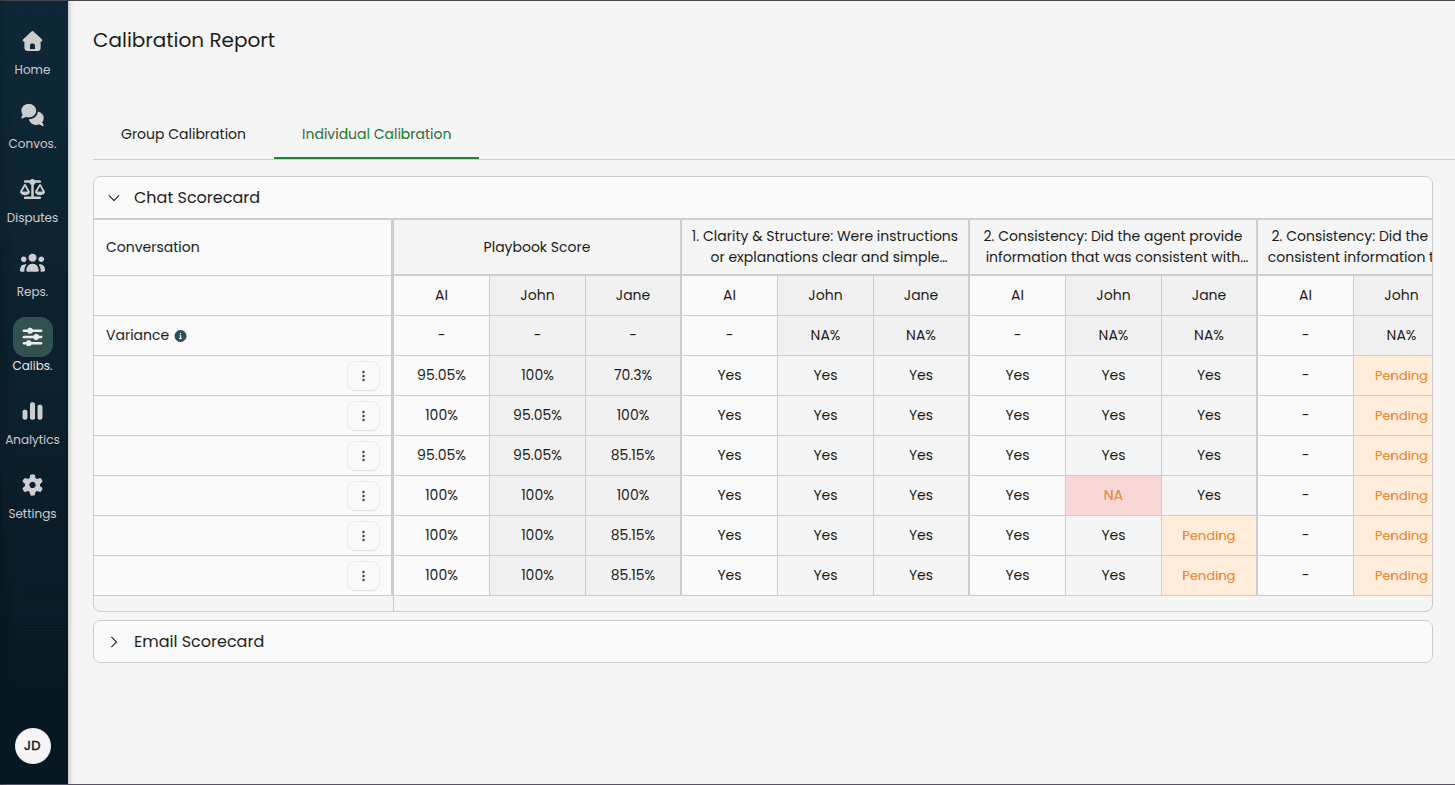
Individual Calibration Tab
Shows the original individual calibration table with all calibrators' evaluations.
Using Group Calibration Insights
The completed group calibration provides valuable data for both AI and human calibrator performance:
Low scores on specific criteria may indicate:
The playbook criterion needs clearer definition
The AI needs retraining on edge cases
The criterion might be too subjective for consistent evaluation
A calibrator may benefit from additional training on a specific criterion
Use these insights to:
Update playbook descriptions and examples
Create test cases from consensus evaluations
Train the AI on the consensus values
Coach individual calibrators where their scores are consistently low
Adjust scoring weights if needed
Analytics & Performance Tracking
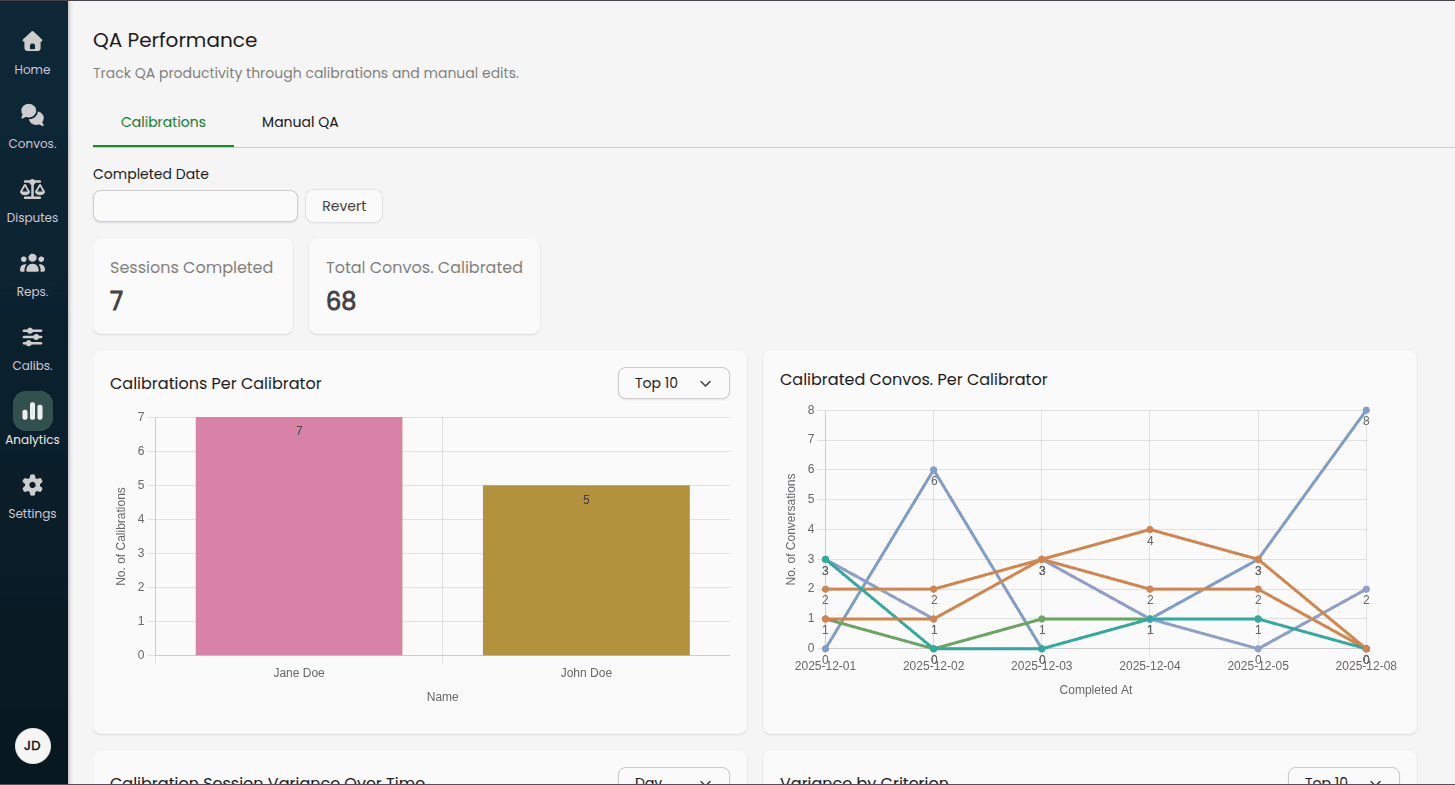
Monitor your calibration program's effectiveness through the Analytics dashboard.
Accessing Calibration Analytics
Navigate to Analytics > QA Performance > Calibrations
Filtering Data
Use the Completed Date filter to analyze specific time periods:
Last 7 days
Last 30 days
Custom date ranges
Interpreting the Data
Healthy calibration programs typically show:
Consistent weekly or daily completion rates
Gradual increase in calibrator and AI scores over time (as playbooks improve)
High completion rates relative to scheduled sessions
Warning signs to watch for:
Multiple missed or overdue sessions
Declining or stagnant scores over time
Single calibrator completing all reviews (should be distributed)
Best Practices
Starting Your Calibration Program
Week 1-2: Pilot Phase
Add 2-3 calibrators initially
Sample 5-10 conversations per session
Run daily sessions to build momentum
Focus on reviewing results together as a team
Week 3-4: Establish Rhythm
Adjust sample size based on calibrator capacity
Fine-tune frequency (daily vs. weekly)
Begin identifying common variance patterns
Start making playbook improvements based on findings
Month 2+: Optimize
Run regular group calibrations for complex cases
Build test case library from calibrated conversations
Track score trends over time for AI and individual calibrators
Expand calibrator team if needed
Calibrator Selection
Good calibrator candidates:
Deep understanding of your quality standards
Consistent, reliable judgment
Available time to complete reviews on schedule
Able to provide constructive feedback
Tips:
Start with 2-3 calibrators to keep sessions manageable
Rotate calibrators periodically to avoid bias
Ensure calibrators represent different teams/perspectives
Sampling Strategy
Balanced sampling considers:
Conversation scores: Include both high and low scoring conversations
Time of day: Morning, afternoon, and evening interactions
Channels: Calls, emails, chats in proportion to your volume
Representatives: All active representatives unless excluded
The system automatically applies these weights, but you can adjust the sample size to focus more deeply on specific patterns.
Responding to Low Scores
When you see low scores for the AI or a calibrator:
1. Review the Specific Disagreements
Look at the highlighted cells (red background) to identify where values differed from consensus
Read remarks left by calibrators and on the consensus to understand the reasoning
Look for patterns (same criterion, same type of conversation, etc.)
2. Diagnose the Root Cause
Is the criterion description unclear?
Is this an edge case not covered in the playbook?
Does a specific calibrator need training on this criterion?
Is the AI missing context?
3. Take Action
Unclear criteria: Rewrite playbook descriptions with specific examples
Edge cases: Document them in the playbook or add to test cases
Calibrator training needs: Share calibration results in team meetings and discuss disagreements
AI issues: Create test cases to train the AI on correct evaluations
4. Measure Improvement
Track scores over time for both the AI and individual calibrators
Expect gradual improvement as playbooks and calibrator training improve
Celebrate wins when scores consistently reach 90% or above
Group Calibration Best Practices
When to use group calibration:
Complex edge cases that need discussion
High-variance criteria needing clarification
Training new calibrators
Quarterly deep-dives into playbook accuracy
How to run effective sessions:
Review individually first: Have calibrators complete individual reviews before the group session
Focus discussion: Only discuss items with disagreement
Document decisions: Use the consensus remark field to explain why a particular value was chosen
Update playbooks: Immediately update criteria based on group discussions
Create tests: Add consensus conversations to test suites
Frequency recommendations:
Monthly group calibrations for mature programs
Weekly during playbook development or major changes
Ad-hoc for specific training needs
Maintaining Momentum
Keep calibrators engaged:
Share insights from calibration data in team meetings
Recognize calibrators who complete reviews on time
Demonstrate playbook improvements driven by their feedback
Rotate focus areas (different playbooks, criteria) to maintain interest
Avoid calibration fatigue:
Don't over-sample (10-20 conversations per session is usually sufficient)
Vary the conversation types in samples
Provide adequate time for completion (3-7 days)
Automate reporting and recognition where possible
Continuous Improvement Cycle
Calibrate: Run regular sessions per your schedule
Analyze: Review variance metrics and specific disagreements
Improve: Update playbooks, coach calibrators, adjust AI
Validate: Create test cases to prevent regression
Repeat: Continue the cycle with improving scores over time
Success metrics to track:
Calibrator and AI score trends (increasing over time)
Calibrator completion rates (consistently high)
Test case pass rates (improving over time)
QA team confidence scores (via surveys)