Tutorials
November 28, 2025
10 coaching workflows used by high-performing support teams

Varun Arora
The System
Customer support performance is rarely a mystery. If you look at the highest-performing CX teams—the top 15% regarding CSAT, First Contact Resolution (FCR), and QA scores—you notice something interesting. They don’t rely on "hero" managers saving the day with ad-hoc pep talks.
They rely on systems.
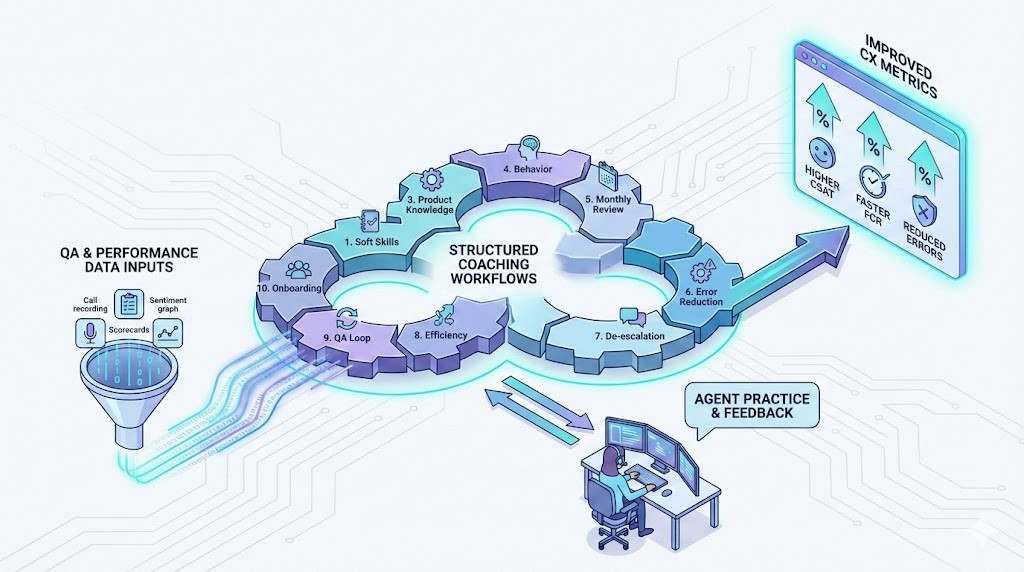
For these teams, coaching isn't an event; it's a workflow. It is a repeatable, data-driven engine directly tied to QA insights.
When coaching is sporadic, it feels like a punishment. When it is systemic, it feels like professional development. This guide breaks down the 10 specific coaching workflows elite teams use to drive performance, and how you can replicate them.
Why "Workflows" Beat "Sessions" (The Data)
Before we dive into the how, let’s look at the why. Industry data paints a clear picture of the ROI of structured coaching versus "gut-feeling" feedback:
Clarity wins: 68% of support errors aren't caused by a lack of effort, but by a lack of clarity on what good looks like.
Performance jumps: Agents receiving structured coaching outperform peers by 20–45% in QA scores.
Faster ramp-up: Standardized workflows reduce time-to-competency for new hires by 28%.
The Bottom Line: Weekly, systematic coaching improves CSAT by an average of 12–18%.
High-performing teams aren’t better because they coach more. They are better because they coach systematically. Here are the 10 workflows that make that happen.
1. The Soft Skills Loop
For when agents sound like robots, not humans.
Soft skills—empathy, tone, and pacing—are often the primary drivers of CSAT. In fact, Salesforce data suggests that 73% of customers value how they are spoken to more than how quickly the issue is resolved.
trigger: QA tags indicate "Robotic Tone," "Rushed," or "Lack of Empathy."
The Workflow:
Isolate: Pull 3–5 conversation samples where the tone dipped.
Compare: Play a "Good" vs. "Needs Work" clip side-by-side.
Micro-Task: Have the agent rewrite the response or re-record the snippet with a warmer tone.
Verify: Monitor the next 10 interactions specifically for sentiment analysis.
2. The Compliance & Risk Workflow
For highly regulated industries (Fintech, Health, Insurance).
In regulated spaces, a "oops" can cost millions. Elite teams don't treat compliance errors as training issues; they treat them as operational failures that need immediate triage.
Trigger: Deviation from SOP, missed disclosure statements, or ID verification failures.
The Workflow:
Flag: Automated QA flags a "High Risk" interaction.
Cite: The coach pulls the exact SOP section the agent missed.
Mock: The agent must perform the disclosure/verification correctly in a mock scenario three times (muscle memory).
Audit: The next 20 tickets are strictly audited for this specific compliance tag.
3. The Product Knowledge Gap Workflow
For when "I don't know" turns into long hold times.
Teams with deep product knowledge have up to 30% higher FCR. This workflow is about closing the gap between a new feature release and agent competence.
Trigger: Incorrect troubleshooting steps, escalation due to confusion, or outdated product specs provided.
The Workflow:
Inject: Provide the specific knowledge byte (a video snippet or article) immediately.
Demo: The agent performs a live walkthrough of the correct troubleshooting path.
Quiz: A short, 3-question quiz to verify retention.
Track: Measure FCR on that specific topic for one week.
4. The Behavioral Correction Workflow
For breaking bad habits.
There is a difference between not knowing something (Knowledge) and having a bad habit (Behavior). Interrupting the customer, dead air, or using "actually" too often are behaviors.
Trigger: A recurring pattern (e.g., interruption) across 5+ calls.
The Workflow:
Root Cause: Determine if it’s a skill gap or a confidence gap.
Plan: Create a 2-week behavior plan.
Reinforce: Agent listens to their own calls specifically to catch the behavior.
Review: Weekly check-in to see if the specific behavioral tag count has dropped in QA.
5. The Monthly Performance Cycle
The bird's-eye view.
This isn't a "check-in." It’s a strategic review. Top teams use this to zoom out from the daily tickets and look at the agent's trajectory.
Trigger: End of month (Recurring).
The Workflow:
Synthesize: Combine QA scores, CSAT, AHT, and Attendance data.
Focus: Pick one major strength to leverage and one major opportunity for the next 30 days.
Contract: Set a specific metric target (e.g., "Raise CSAT from 4.2 to 4.5").
6. The Error-Reduction Workflow
For killing repeat mistakes.
A single error is a mistake; a repeat error is a process failure. This workflow is designed to stop the bleeding on specific, high-impact errors (like incorrect refund eligibility).
Trigger: Repeated misinformation or wrong process logic identified by QA.
The Workflow:
Impact: Show the agent the downstream effect (e.g., "This error cost $50").
Correction: Review the "Golden Path" (the perfect execution).
Practice: Agent resolves 3 mock tickets dealing with this specific error.
Gatekeep: Daily spot-checks on this topic for 5 days.
7. The De-escalation Drill
For turning angry customers into loyal ones.
De-escalation is a high-stress skill. You cannot learn it by reading a PDF; you learn it by simulation.
Trigger: Rising customer frustration scores or premature escalations.
The Workflow:
Heat Map: Identify the moment in the call where the customer flipped from "annoyed" to "angry."
Scripting: Provide the "Acknowledge $\rightarrow$ Clarify $\rightarrow$ Resolve" framework.
Roleplay: The manager plays the angry customer; the agent practices the framework until they don't sound defensive.
8. The AHT & Efficiency Workflow
For balancing speed and quality.
High AHT (Average Handle Time) usually means the agent is taking the "scenic route" to the solution.
Trigger: Long hold times, excessive navigation, or long periods of silence.
The Workflow:
Map: Review a long ticket and map where the time went (e.g., 3 minutes spent searching the Knowledge Base).
Shortcut: Teach the search modifiers or shorter phrasing to get to the solution faster.
Sprint: Challenge the agent to resolve similar tickets 10% faster for one week.
9. The "QA to Coaching" Loop
The Golden Thread.
This is the most critical workflow. It ensures that QA isn't just a "score"—it's a catalyst for change.
Trigger: Automated QA scoring runs daily/weekly.
The Workflow:
Group: Insights are grouped by category (People, Process, Product).
Assign: Coaching tasks are auto-generated based on the lowest scoring category.
Close: The loop is only considered "closed" when the next QA score on that topic improves.
10. The Onboarding Ramp
For new hires.
New hires are vulnerable. They need structure to survive the "drinking from the firehose" phase.
Trigger: New agent start date.
The Workflow:
Week 1: Foundational Skills (Navigation & Tone).
Week 2: Product Deep Dive (Troubleshooting).
Week 3: Speed & Efficiency (AHT).
Week 4: Graduation (Full QA Compliance).
Conclusion
High-performing teams don't leave performance to chance. They don't rely on intuition, and they definitely don't rely on occasional pep talks. They rely on the systems we’ve outlined above. Whether you are a team of 5 or 500, the path to elite CSAT scores is the same: repeatable, data-driven coaching. The templates above are your toolkit. Now, it’s time to build.
FAQs
1. How many workflows should we run at once?
Don't overwhelm agents. Run the QA Loop constantly, and layer in 1–2 specific workflows (like Soft Skills or Efficiency) per agent based on their needs.
2. Is this overkill for small teams?
No. It’s actually more critical. In small teams, one person’s bad habits affect a larger percentage of your customers. Systems scale; chaos does not.
3. How does AI fit in?
AI is the detector. It finds the triggers (the long calls, the angry customers, the compliance breaches) so the manager can focus on the human side: the coaching.
4. How often should we update these?
Review your workflows quarterly. If your product changes, your "Product Knowledge" workflow needs an update.
5. What is the biggest mistake leaders make here?
They treat the "Template" as the result. The result is the behavior change. The template is just the tool to get there.